
How to Download Casino Prive Safely: A UK Player’s Guide
UK players looking for a Casino Prive download should start with one important distinction: a casino website that works in a mobile browser is not necessarily an app, and an app found online is not necessarily genuine. Before installing anything or sharing personal details, check that the service is available to you and authorised for UK play. This guide explains how to verify the source, use safer download practices and choose a browser-based option when an official app cannot be confirmed.
Start by checking whether Casino Prive is available in the UK
Online gambling rules depend on where a player is located. In Great Britain, a casino offering gambling to local customers generally needs the appropriate operating licence from the UK Gambling Commission (UKGC). Do not assume that a casino is licensed for the UK because its website loads, it accepts a familiar payment method, or a search result calls it “UK friendly”.
Look for the operator’s legal name and licence information on the casino website, usually in the footer or in its terms and conditions. Then check the operator against the UKGC’s public register. The brand name and the company name can differ, so compare the legal entity, domain and licence details rather than relying on a logo or badge alone. If you cannot verify the details, do not deposit or submit identity documents.
Availability can change, and a site may restrict access by country. Read its current terms and contact support using contact details published on the official site if the UK position is unclear. Avoid attempts to get around location checks: they may breach the operator’s terms and can complicate withdrawals or account reviews.
Is there an official Casino Prive app?
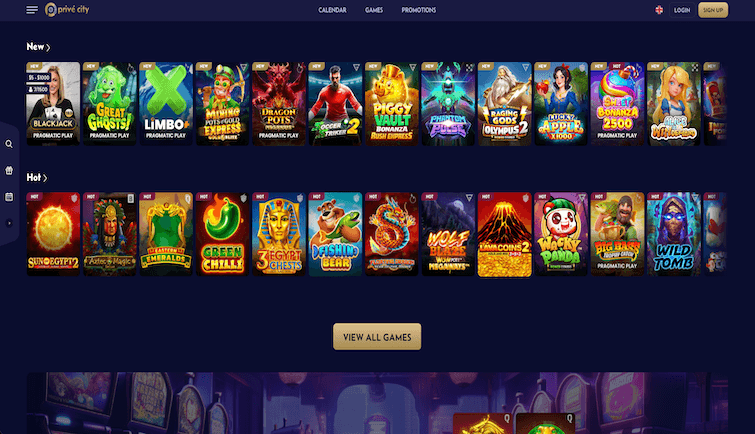
Before downloading, establish whether Casino Prive currently provides an official app for your device and region. Check the casino’s own website for a direct link to the Apple App Store or Google Play. If no store listing or official download instructions are provided, do not treat third-party APK files, “casino app” download sites or social media links as official.
On an iPhone or iPad, installing an app from the App Store is generally safer than installing a configuration profile or software from an unfamiliar website. On Android, Google Play offers a more controlled route than a downloaded APK, though store presence alone is not a guarantee of quality. Check the developer name, app description, update history and requested permissions. If an installation guide asks you to disable security protections, install a certificate, or grant unrelated access to contacts, messages or accessibility features, stop.
Safer steps before installing
- Type the known casino address yourself. Avoid sponsored search links and messages that could lead to lookalike websites.
- Check the domain carefully. Watch for extra words, misspellings, unusual extensions and subtle character substitutions.
- Follow only a link from the verified site. Confirm that the destination is the expected official app store or a clearly documented operator download page.
- Review the publisher and permissions. The app should not demand access that has no reasonable connection to casino play.
- Keep your device updated. Install operating-system and browser security updates before entering account or payment information.
- Use a unique password. Do not reuse your email, banking or other gambling-site password, and enable additional account security if offered.
- Read the privacy and account terms. Understand what data is collected, how identity checks work and how to close the account.
Using Casino Prive in a mobile browser
If there is no verifiable official app, a mobile browser may be the safer and simpler option. Open the casino’s verified website directly in an up-to-date browser and check that the address remains consistent as you navigate. A padlock symbol means the connection is encrypted; it does not prove that the website is genuine or that the operator is licensed.
Some sites offer an “add to home screen” shortcut. This usually creates a convenient link to a web page rather than installing a full native app. Confirm the website address before saving the shortcut, and remember that a shortcut does not independently establish that the casino is trustworthy. Do not save passwords on a shared device, and log out after a session, particularly when using public Wi-Fi.
Expert feedback: a practical security check
Experienced player’s checklist
“I don’t install a casino app just because a bonus page recommends it. I first check the operator, then follow the app link from the operator’s verified website. If there is no clear official link, I use the browser or wait for confirmation. I also read withdrawal and identity-check terms before depositing.”
This is a useful routine, but personal experience is not proof of a casino’s licensing or security. Verify regulatory and technical details independently, and never rely on testimonials or claims of guaranteed payouts.
Bonus offers and promo codes: check the terms first
Download promotions can be a source of misleading links. A message promising a large welcome bonus, free spins or an urgent “app-only” reward may lead to a counterfeit site or an offer with restrictive conditions. Enter promo codes only on the verified casino website or within a verified app, and do not install software simply to claim a promotion.
Before accepting an offer, read the terms for wagering requirements, eligible games, maximum bet limits, expiry dates, withdrawal restrictions and any maximum cash-out. Bonus funds are not the same as withdrawable cash. If the offer’s conditions are missing, inconsistent or difficult to find, skip it and ask the casino’s official support team for clarification.
Payments, identity checks and account safety
Legitimate gambling operators may ask customers to verify identity, age, address or payment ownership. These checks can be part of regulatory and anti-fraud procedures, but documents should be submitted only through a secure, verified account area. Do not send passport images, bank details or verification codes to an email address or messaging account supplied by an unsolicited contact.
Check payment rules before depositing. Confirm supported methods, minimum and maximum amounts, fees, withdrawal processing times and whether the casino requires withdrawals to return through the original payment method. A deposit completing successfully does not establish that an operator is authorised or that a withdrawal will be straightforward.
Use a payment method you understand and can monitor. Never pay a supposed “release fee” or make an extra deposit because someone claims it is required to unlock winnings. If a request seems suspicious, stop and contact the operator through its verified website. You can also speak to your bank or payment provider if you believe you have shared financial information with a fraudulent service.
What to do if you downloaded a suspicious file
- Do not open it or enter account details. Disconnect from the page and remove the file if it has not been installed. casino prive customer support quality
- If installed, uninstall the app. Review device settings for unfamiliar profiles, certificates, administrator access or permissions, and remove anything you do not recognise.
- Run a security check. Update your device and use its trusted security tools. If you are unsure whether the device is compromised, seek help from the manufacturer or a reputable technician.
- Change exposed passwords. Use a different, trusted device where possible, especially if you entered credentials into a suspicious app or site.
- Contact your bank if payment details were exposed. Monitor transactions and follow the bank’s advice on blocking cards or disputing unauthorised payments.
- Report the incident. Keep screenshots, URLs and messages. Report suspected fraud to the relevant platform and UK authorities, such as Action Fraud in England, Wales and Northern Ireland, or Police Scotland.
Responsible gambling and UK protections
Only gamble if you are legally eligible and can afford to lose the money you spend. Set a budget and time limit before playing, and do not chase losses or borrow to gamble. Gambling is not a reliable way to make money. If gambling stops feeling enjoyable or begins affecting your finances, relationships or wellbeing, stop and seek support.
For people in Great Britain, licensed operators are expected to provide tools such as deposit limits and self-exclusion options. Their availability and operation depend on the operator and current rules, so check the account settings and terms. GamCare offers confidential support in the UK, and the National Gambling Helpline can be reached on 0808 8020 133. If you are in immediate danger, contact emergency services.
Frequently asked questions
Can I download Casino Prive from an APK website?
It is not advisable unless the operator clearly identifies that exact download source as official and you have independently verified the service’s UK status. Unknown APK files can be altered, outdated or designed to steal personal information. A browser is a safer alternative when an official app cannot be confirmed.
Does the padlock in my browser prove that the casino is safe?
No. It indicates an encrypted connection between your browser and the site, but scammers can also use encryption. Check the domain, operator identity, licence status and terms separately.
What if the app is in an official app store?
Check that the publisher matches the operator identified on the casino’s verified website, and follow the store link provided there. Review permissions, recent updates and privacy information. An app-store listing does not replace checking whether the casino is authorised for UK customers.
Is a home-screen shortcut the same as an app?
Usually not. It commonly opens the casino website in a browser. Verify the address before saving or using the shortcut, and do not assume it has been independently vetted.
Final checklist before you play
- Confirm that the operator is authorised to serve players in your part of the UK.
- Use an app-store link supplied by the verified casino website, or use the browser instead.
- Avoid unsolicited download links, unknown APKs and requests to disable device security.
- Read bonus, payment, privacy and withdrawal terms before opening an account or depositing.
- Set limits, protect your login details and stop if anything about the site or installation feels wrong.
A safe Casino Prive download begins with verification, not installation. If you cannot establish that an app is official and that the service is permitted to accept UK players, do not proceed. Choosing not to download is the right decision whenever the source, licence or terms remain uncertain.