
When an Online Casino Lobby Becomes Difficult to Navigate
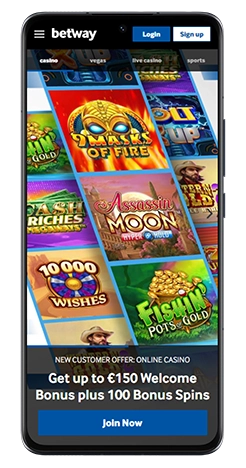
A crowded casino homepage can make simple choices feel harder than they should. Betya presents casino and sportsbook access through one account, while its casino lobby groups thousands of titles into menus, collections and game categories. For readers assessing betya casino no deposit information, the practical question is not only which games appear, but whether the interface helps you find relevant details without rushing you into a decision. A clear navigation routine can reduce confusion, highlight important conditions and make mobile browsing more manageable.
Start with the lobby structure, not the promotional banners
The most useful first step is to identify how the homepage is organised. A large promotional panel may draw attention to a welcome offer, tournament or featured title, but it does not necessarily tell you how to browse efficiently. Look for the main casino entry point, the sportsbook switch, account controls and the search or category tools. Because one account is described as serving both casino and sports betting, separating those areas mentally is important when comparing information.
The casino lobby uses several practical groupings. These include New, Top 50, Hot, Originals, Betya’s Best, Favorites and Recents, along with categories such as Video Slots, Classic Slots, Live Dealer, Blackjack, Roulette, Table Games, Video Poker, Jackpot and scratch cards. These labels serve different purposes. “New” is time-oriented, “Top 50” is a ranking-style collection, and “Favorites” or “Recents” are personal shortcuts. They should not be treated as identical measures of quality or suitability.
A sensible browsing order is to begin with a broad category, narrow the results using a recognisable game type, then open individual titles for their specific information. If the lobby feels busy, avoid jumping between promotional tiles and game rows. Instead, note which menu leads to the content you actually want. This small habit makes it easier to return to a category later and reduces the chance of selecting a game simply because it was placed prominently on the homepage.
How can categories make a large catalogue easier to use?
A catalogue described as containing more than 5,000 titles can be useful only when its filters reduce the amount of irrelevant material. Slots, table games, live dealer tables, bingo, keno, video poker, scratch cards, crash games and instant games appeal to different browsing preferences. Choosing the broadest suitable category first prevents a search for roulette, for example, from being mixed with hundreds of unrelated slot titles.
Provider names can also help experienced players locate familiar design styles. The catalogue is associated with studios including Pragmatic Play, Evolution, Play’n GO, Yggdrasil, BGaming and many others. However, a provider filter should be treated as a navigation aid rather than an endorsement. A familiar studio does not make every title identical, and it does not remove the need to read the game’s own rules, paytable or applicable conditions.
Collections such as Hot, Betya’s Best and Top 50 may be convenient starting points when you have no particular game in mind. They are less useful when you are trying to make a controlled comparison, because their selection criteria may not be obvious from the label alone. Use them to discover possibilities, then move to the title page and confirm the information that matters to you, including game type, available demo mode and any displayed RTP details.
Use title pages to check details before committing attention
Opening a game is not the same as understanding it. Where title-specific information is provided, examine the paytable, rules, features and any displayed RTP before spending time on the game. Some RNG titles reportedly offer demos, which can help you learn the controls and visual layout. A demo can demonstrate how a game operates, but it cannot establish that you will receive a particular result or make future real-money outcomes predictable.
Game labels also deserve careful interpretation. “Progressive jackpot” describes a jackpot structure, not a promise that a win is likely. “Crash,” “Mines,” “Hold & Win,” bonus buys and cascading reels describe mechanics or features, not expected value. Live dealer pages may show video streams, dealer chat and tables for blackjack, roulette or baccarat, but the presence of a live interface does not replace checking table rules, limits or the conditions attached to any promotion.
When comparing two titles, keep the comparison narrow. Check whether both are the same game type, whether the displayed RTP information refers to the exact title and whether the wager controls are easy to understand. If a rule, payout explanation or eligibility condition is unclear, pause rather than relying on a thumbnail or a marketing description. The operator’s stated requirements should be treated as the controlling source for account and promotional questions.
Mobile browsing needs a different navigation routine
The mobile experience is described as a responsive browser-based service for current iOS and Android phones and tablets. That means the interface is intended to adapt to a smaller screen, while registration, account access, games, live dealer content and account functions remain browser-based. The reviewed material does not identify a dedicated native iOS or Android casino app, so readers should distinguish a mobile website from an installed application.
On a phone, long rows and small controls can make accidental selections more likely. Rotate the device only when it genuinely improves visibility, and allow pages or streams to finish loading before tapping repeatedly. If a filter appears to have failed, check whether the results changed rather than assuming the first visible row is still the complete list. Bookmarking a browser page may be convenient, but it does not turn the site into an official app.

Mobile navigation is also a poor setting for hurried decisions. A smaller display may hide terms below a button, place account menus behind an icon or make a game’s information panel harder to read. Before taking any account action, confirm that you are viewing the correct section and that the details are legible. For general information about gambling-related harms and support, CAMH information about problem gambling is a useful Canadian public-health resource.
Which account shortcuts deserve regular attention?
A usable homepage should help you reach account information without searching through game categories. Check where the account menu displays identity status, transaction history, bonus balances, reward progress and responsible-gambling settings. These controls are more important than decorative lobby sections because they explain what is happening around your account. If a document request or review is shown, read the instruction carefully and use only the submission route stated by the operator.
Verification can affect access to account functions. The supplied information says checks may occur before a first withdrawal or after a transaction or account review. Documents can include government-issued photo identification, proof of address and evidence that a payment method belongs to you. If a card copy is requested, the stated guidance says only the first six and last four digits should remain visible. Do not email sensitive material to an address unless the operator specifically identifies that route.
Finally, make the account-controls area part of your navigation routine rather than visiting it only after a problem appears. Deposit limits, cooling-off periods, time-outs, self-exclusion, wager or loss limits and account closure are described as available tools, although their operation and timing should be checked in the current terms. Support is listed through live chat and email. If access is locked, restricted or under review, use the formal support process instead of repeatedly attempting to log in.
Questions readers often ask about navigating the lobby
Is the homepage’s “Top” section a recommendation?
Not necessarily. A “Top 50” or similar collection is a navigation category, but the criteria behind its ordering may not be clear. Treat it as a discovery tool. Open the individual title, read the rules and check the available information before deciding whether it suits your preferences.
Can a mobile browser be treated as a casino app?
No. A responsive website can work on phones and tablets without being a native application. The available material describes browser-based mobile access and does not identify a dedicated installed app. Use the browser address and current account controls rather than assuming an app offers different features or security.
What should I do if a game’s information is unclear?
Do not rely on the thumbnail, category label or a promotional message. Open the title’s rules and paytable, check any displayed RTP information and review the applicable terms. If the explanation remains incomplete, contact support or choose another title whose instructions are easier to understand.